Raspberry Pi Pico and Zephyr USB networking: fixing the flash cache problem
In the previous post I found why the Raspberry Pi Pico answers USB network echoes slowly. The Zephyr network and USB code runs from the external flash chip through a 16 KB cache, and the code that one echo needs does not fit in that cache. I promised to try a better arrangement of the code in flash. This post gives the result.
Background: where the Pico keeps its code
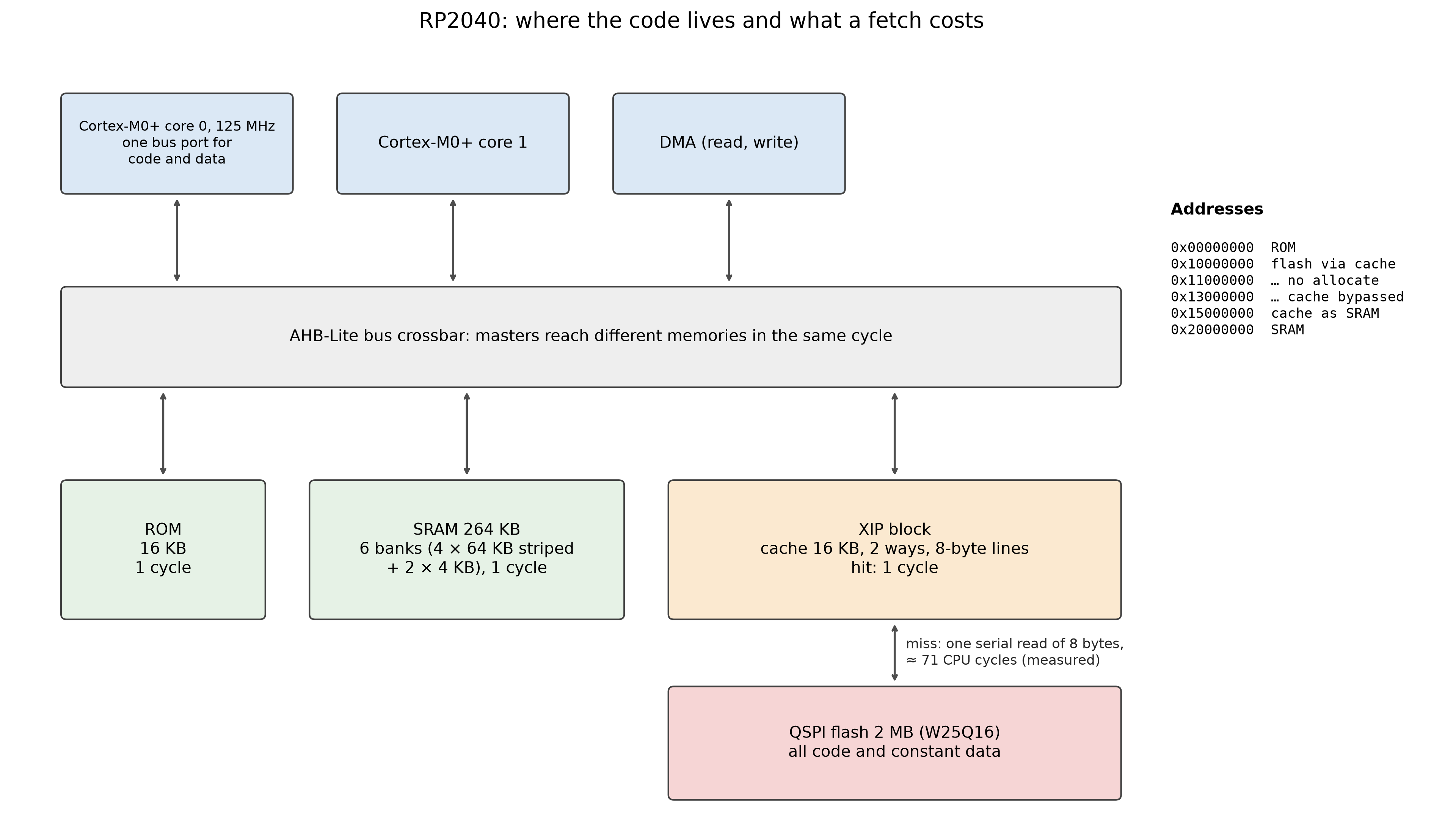
The RP2040 has two Cortex-M0+ cores (Zephyr runs at 125 MHz), 264 KB of SRAM, a 16 KB boot ROM, and no internal flash. All program code and constant data live in an external 2 MB flash chip on a quad-SPI bus. A bus crossbar connects the cores and the DMA to the ROM, to six SRAM banks, to the peripherals, and to the “execute in place” (XIP) block, which reads the flash for the CPU. SRAM and ROM answer in one clock cycle, and different masters can use different banks in the same cycle. The Cortex-M0+ has one bus port: instruction fetches and data loads share it.
Flash without a cache
The flash is a serial device. For each read, the XIP block sends the address on four data lines, waits a few clocks, and then receives the data four bits per clock. On this board one read of 8 bytes costs about 71 CPU clock cycles; I measured this as the extra time per cache miss. From SRAM the same 8 bytes take two one-cycle fetches. If every instruction fetch went to the flash (the cache switched off, or code run from the uncached address alias 0x13000000), a stretch of code that runs at about one instruction per cycle from SRAM would run roughly 20 to 35 times slower. That is an estimate from the measured miss cost, not a measurement with the cache off; the datasheet only says that it “has a significant impact on XIP code execution performance”.
The XIP cache
The cache keeps recently used flash contents in 16 KB of on-chip memory. A hit costs one cycle, like SRAM. The cache is organised in 8-byte lines: 2,048 lines in 1,024 sets of two (“two-way set-associative”, datasheet §2.6.3.1). The set of a flash address is fixed by its address bits: set = (address ÷ 8) mod 1024. So flash lines that are a multiple of 8 KB apart compete for the same set, and each set can hold only two of them. When a third line of the same set is needed, it replaces one of the two (the datasheet does not document which one), and that line must come from the flash again the next time.
A repeated code path, such as the handling of one network packet, can therefore miss for two reasons. Capacity misses: the path touches more than 16 KB of distinct lines, so it cannot all stay in the cache. Conflict misses: more than two often-used lines map to the same set, although other sets are free. The linker places functions in the order of libraries and object files, not by use, so the hot functions of one echo are spread over most of the 92 KB image and land in sets more or less at random. In the stock build, 226 of the 1,024 sets hold three to six lines that run during every ping: those lines evict each other on every echo.
Cache colouring
Cache colouring removes conflict misses by choosing where each hot function starts. Each set range is a “colour”; a function placed at a given address occupies the sets of its lines. The tool does this:
- Sample the program counter while the board handles traffic, and find which 8-byte lines of each function run, and how often.
- Take the functions one at a time, heaviest first. For each, try every possible start set and keep the one that adds the fewest predicted misses (a set with more than two hot lines costs misses on every pass).
- Write a linker script fragment that puts each function at an address with that start set, with padding between functions. Flash is plentiful (the image grows from 92 KB to about 120 KB of the 2 MB). Each function keeps its start address modulo 8, so its lines split exactly as in the profile.
- Check the linked image: every function must sit at its planned address.
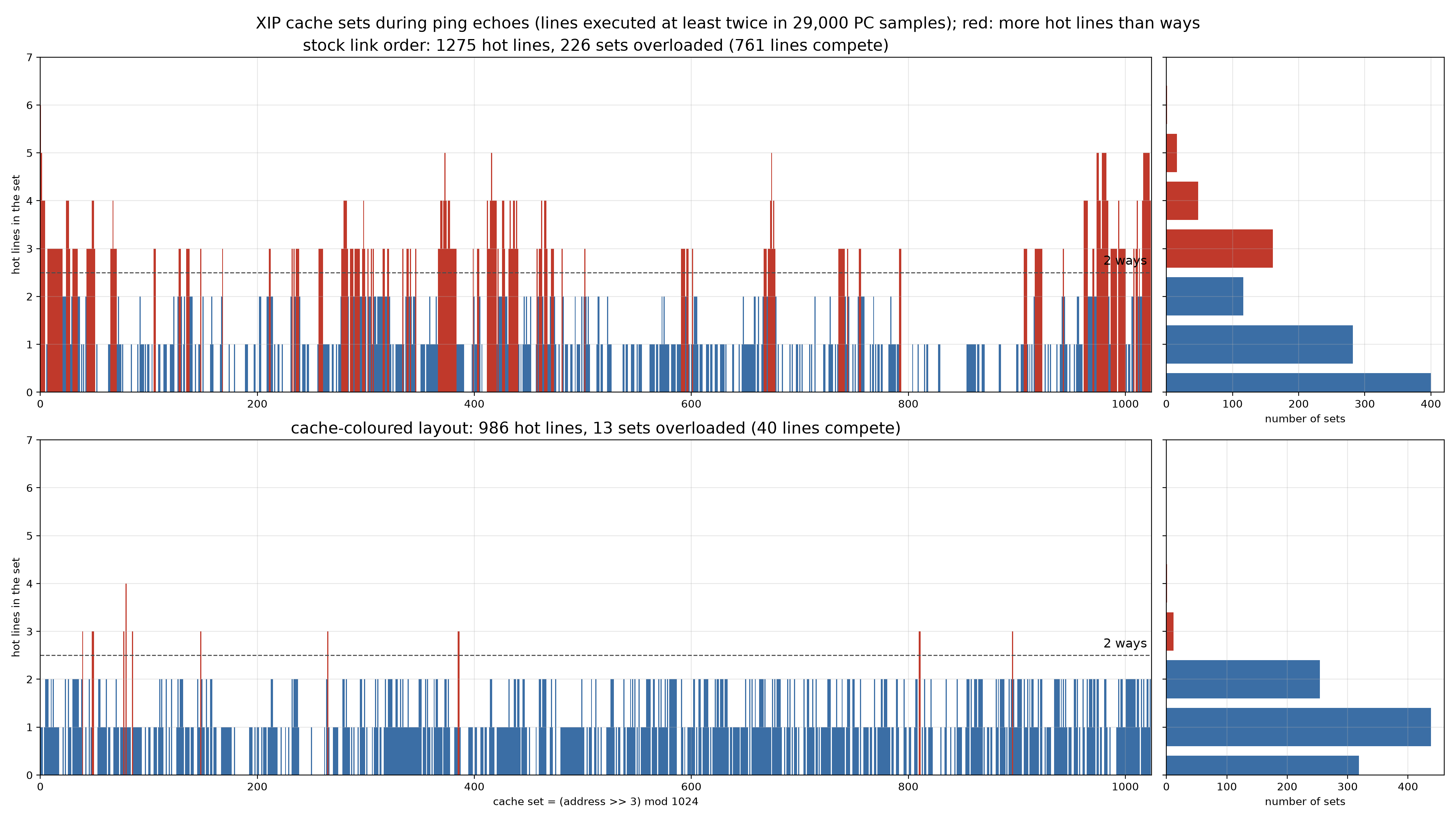
Colouring cannot remove capacity misses. If the hot path is larger than the cache, some of it must still come from flash on every pass, or move to SRAM. The first measurement below shows that this is exactly the situation on the Pico.
Short answer
Layout alone halves the time per ping, but it cannot fix the problem, because one echo uses more code than the cache holds. A combination works very well: put about 150 well-chosen functions (12–16 KB) in SRAM, and arrange the rest of the hot code in flash so that it does not collide in the cache. With that, the Pico at 125 MHz answers about 2,250 UDP echoes per second, against 322 before. That is more than a stock Teensy 4.1 at 600 MHz (2,170) and more than moving whole libraries to SRAM, at a third of the RAM. (The Teensy has the same problem; with the same method it becomes ten times faster.)
Read the full report for the method, all measurements, the experiments that failed, and the limits.
Results: the code does not fit
I flushed the cache and counted the cache misses for one echo. A ping touches 27 KB of different flash lines; a UDP echo through a socket touches 39 KB. The cache holds 16 KB. When the working set is larger than the cache, a good layout can only reduce conflicts. It cannot remove capacity misses.
The best layout without extra RAM is the cache colouring described above. For ping, the time inside the board falls from 1.75 ms to 0.88 ms per echo, with no extra RAM. For UDP echo the gain is smaller: 322 to 412 echoes per second, or 650 with link-time optimization.
A little SRAM goes a long way
Moving whole libraries to SRAM costs 48 KB. Choosing single functions is much more economical. I sample the program counter over the debug port while the board works, rank functions by samples per byte, and move the densest ones to SRAM.
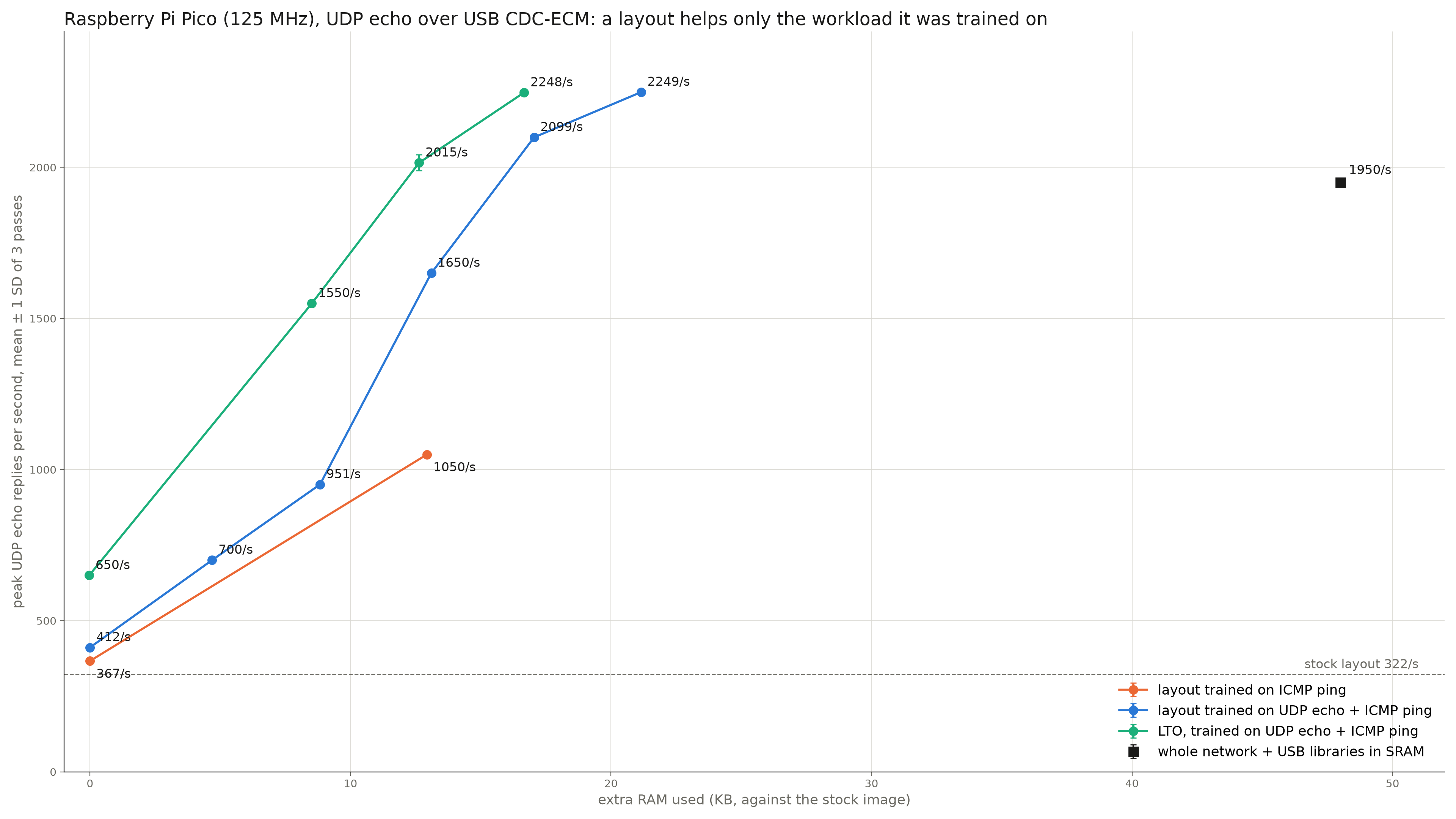
Two results surprised me. First, a layout helps mainly the workload it was measured on: a layout made from ping traffic hardly helps UDP. Second, a plain list of function names keeps most of the gain: without the build-specific colouring, the 16 KB list still gives 81–89 % of the improvement, and it continued to work after I changed the network code. That makes a list of names a realistic candidate for an upstream Zephyr change.
Limits
One board, one Zephyr version, one simple echo application at 125 MHz. A real application has its own code competing for the same cache, so its layout must be measured with that application running. Above about 1,900 echoes per second some single test steps collapse in one of three passes; I have not analysed that yet.
Evidence: measured on a Raspberry Pi Pico (RP2040), Zephyr main of 31 October 2026, USB CDC-ECM, 1 November 2026. Every number is the mean of 3–9 independent runs; the spread is below 2 %.